HRMS Employee Dashboard
A modern, production-ready Employee Attendance Dashboard module for Odoo that gives employees and HR teams a single interactive interface to monitor attendance, working hours, holidays, leaves, celebrations, and project assignments — all in real time.
This module enhances the default Odoo attendance experience by presenting data in a beautifully designed calendar-based view with glassmorphism styling, live timers, and instant statistics. It integrates seamlessly with the HR, HR Attendance, HR Holidays, and Project modules.
Key Features
| Feature | Description |
|---|---|
| Attendance Calendar | Color-coded monthly calendar showing Present, Absent, Holiday, Leave, Weekend, Penalty, and Future statuses |
| Check-In / Check-Out | One-click attendance with timestamps displayed in the user's timezone |
| Live Work Timer | Real-time counter showing hours worked today with accumulated time across multiple check-ins |
| Attendance Statistics | Monthly summary with counts for Present, Absent, Holiday, Leave, Weekend, and Penalty days |
| Leave Balances | View allocated vs. remaining days for each leave type (Casual, Sick, Annual, etc.) |
| Celebrations | Upcoming employee birthdays and work anniversaries within the next 30 days |
| Projects & Tasks | View assigned projects with task breakdown by stage and overall project status |
Dashboard Overview
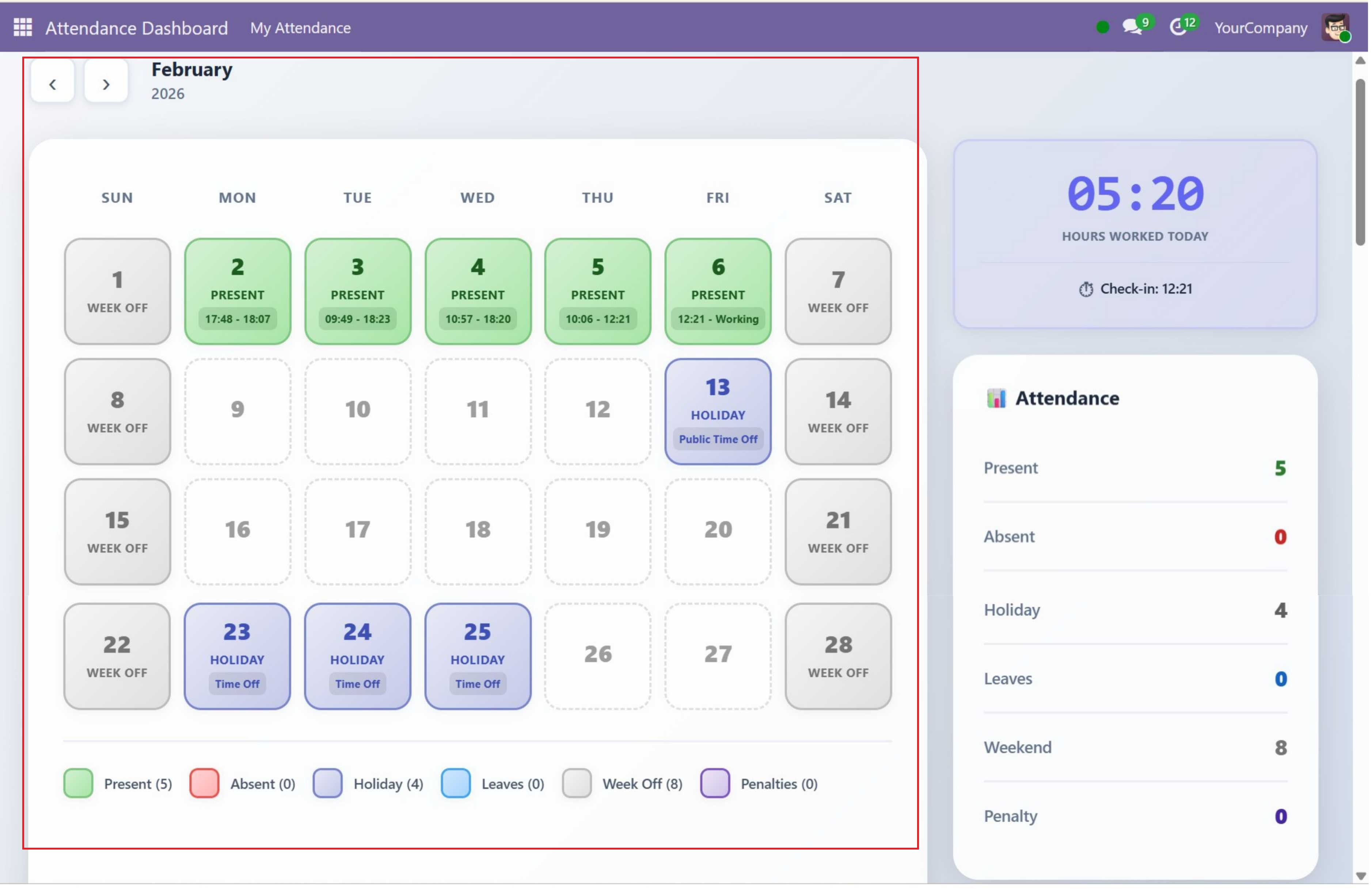
The dashboard is rendered as a client-side Owl JavaScript component and is divided into four main areas:
| Area | Position | Contents |
|---|---|---|
| Header | Top of the page | Month navigation arrows, current month name, and year |
| Calendar Section | Main content (left) | 7-column calendar grid (SUN–SAT) with date, status label, and time info per day. Color-coded legend with status counts below. |
| Sidebar Section | Right side | Work Timer Widget, Attendance Statistics Panel, and Leave Balances Panel |
| Bottom Row | Full-width below calendar | Celebrations Panel (birthdays & anniversaries) and Projects Panel (task breakdown by stage) |
Supported Versions
| Property | Value |
|---|---|
| Odoo Version | 17.0, 18.0, 19.0 |
| Edition | Community |
| License | LGPL-3 |
| Category | Human Resources |
| Author | SDLC Corp |
Quick Start
- Install the Module
- Link Employee to User
- Set Access Rights
- Open the Dashboard
- Start Tracking Attendance
Need Help?
Contact SDLC Corp at sdlccorp.com/contact-us or email sales@sdlccorp.com