Magento 2 Connector — Instance Configuration
The Instance form is the central hub for managing your Magento 2 connection. It stores all connection credentials, sync preferences, payment settings, and auto-sync configuration.
Accessing Instances
Navigate to Magento > Instances to view all configured Magento store connections. Click on an instance to open the configuration form.
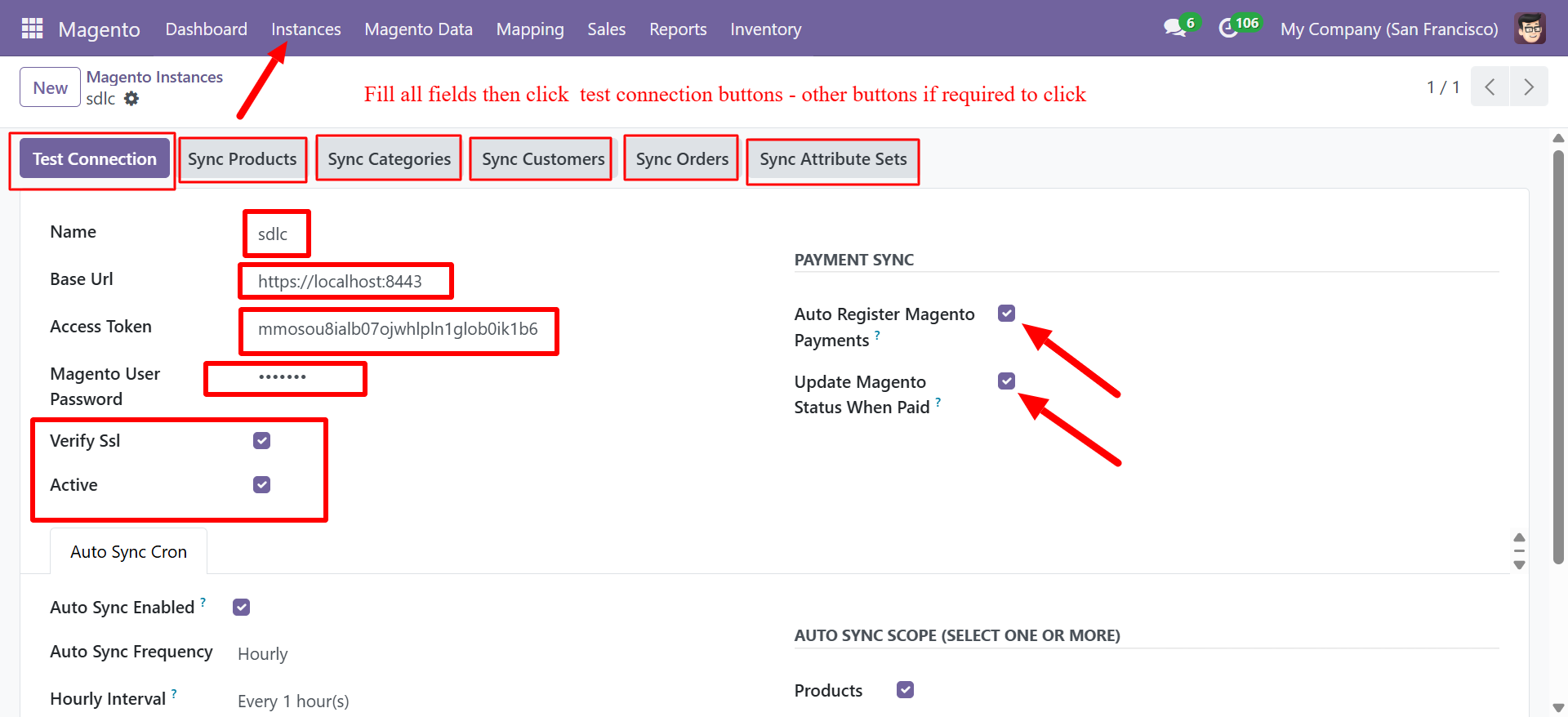
Connection Fields
| Field | Type | Description |
|---|---|---|
| Name | Text | A descriptive name for this Magento instance |
| Base URL | URL | The base URL of your Magento store (e.g., https://magento.example.com:8443) |
| Access Token | Text | The Magento Integration Access Token for API authentication |
| Magento User Password | Password | The Magento admin user password |
| Verify SSL | Checkbox | Enable SSL certificate verification for API calls |
| Active | Checkbox | Enable or disable this instance connection |
Always use HTTPS for production environments. Disabling SSL verification is acceptable only for local development or testing setups.
Test Connection
Click the Test Connection button to verify that Odoo can successfully communicate with your Magento store's REST API. The connector will:
- Attempt to authenticate using the provided Access Token
- Query the Magento API for store information
- Display a success or error message
If the test fails, verify your Base URL includes the correct port (if non-standard) and that your server's firewall allows outbound connections to the Magento host.
Sync Buttons
The instance form provides quick-action buttons for manual synchronization:
| Button | Action |
|---|---|
| Test Connection | Validates the API connection to Magento |
| Sync Products | Pulls all products from Magento into Odoo |
| Sync Categories | Imports the Magento category tree into Odoo |
| Sync Customers | Imports customer records from Magento |
| Sync Orders | Pulls orders from Magento into Odoo |
| Sync Attribute Sets | Imports Magento product attribute sets |
Payment Sync Settings
Configure how payment data is handled during order synchronization:
| Setting | Description |
|---|---|
| Auto Register Magento Payments | Automatically register payment entries in Odoo when orders are pulled from Magento |
| Update Magento Status When Paid | Push payment status updates back to Magento when an invoice is paid in Odoo |
Auto Sync Configuration
Configure automated synchronization schedules directly from the instance form:
| Field | Description |
|---|---|
| Auto Sync Enabled | Enable or disable automatic cron-based synchronization |
| Auto Sync Frequency | Set the frequency interval (e.g., Hourly) |
| Hourly Interval | Define the exact interval (e.g., Every 1 hour(s)) |
| Auto Sync Scope | Select which data types to include in auto-sync (Products, Customers, Categories, Orders) |
Auto-sync uses Odoo's built-in cron scheduler. See Auto Sync Cron Jobs for detailed configuration.
Multi-Instance Support
You can configure multiple Magento instances to connect different Magento stores or environments (production, staging) to a single Odoo database. Each instance operates independently with its own:
- Connection credentials
- Sync schedules
- Payment settings
- Field mappings