PrestaShop Connector — Inventory Management
When to refresh manually
The auto-sync keeps PrestaShop stock and Odoo stock in step on a schedule. Use the manual refresh on this page when:
- A specific product looks wrong and you want to force-sync it before troubleshooting deeper.
- You've made a bulk stock change in one system and don't want to wait for the next scheduled run.
- You're debugging a discrepancy and want a clean before/after view to compare.
Overview
The Inventory section of the PrestaShop Odoo Connector is your live view of stock as PrestaShop reports it, alongside Odoo's own warehouse counts. Use it to spot drift early and trigger a refresh before mismatched counts cause oversells. Navigate to PrestaShop > Inventory.
The inventory view shows all synced products with their stock status:
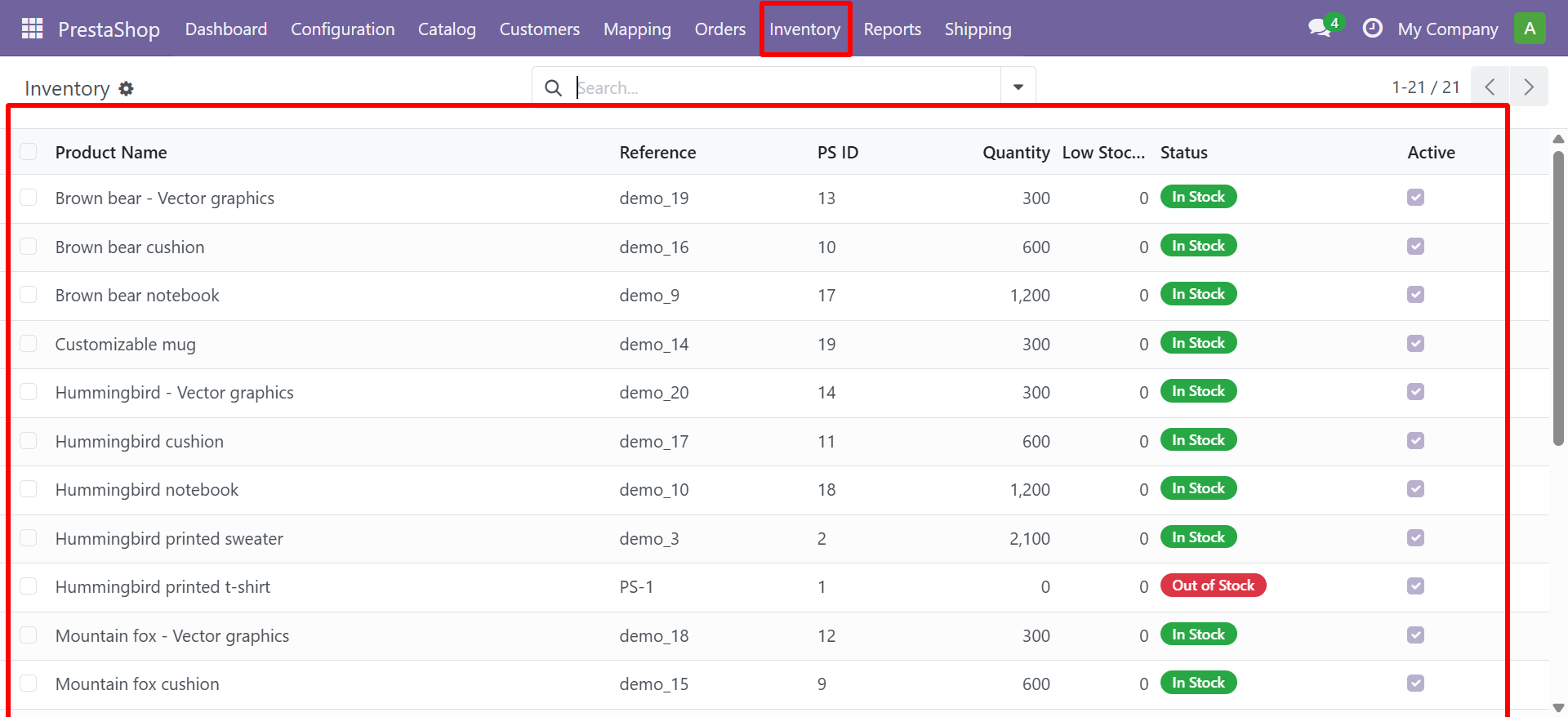
Stock Status
| Status | Color | Description |
|---|---|---|
| In Stock | Green | Quantity is above the low stock threshold |
| Low Stock | Orange | Quantity is at or below the threshold but greater than 0 |
| Out of Stock | Red | Quantity is zero |
Actions
- Use the Refresh Inventory button to re-sync stock quantities from PrestaShop
- PDF reports can be downloaded for in-stock and out-of-stock products
Need Help?
Contact SDLC Corp at sdlccorp.com/contact-us