PSQL Query Execute — Installation and Setup
Prerequisites
- A working Odoo 17, 18, or 19 Community Edition instance
- System administrator access to your Odoo instance (
base.group_system) - The Discuss (
mail) module installed (usually pre-installed) - Developer Mode enabled for initial setup
Dependencies
The module has minimal dependencies -- one Odoo module and one Python library.
Odoo Module Dependencies
| Module | Technical Name | Purpose |
|---|---|---|
| Discuss (Mail) | mail | Provides mail.thread and mail.activity.mixin for chatter, message tracking, followers, and activity management |
Python Library Dependencies
| Library | Purpose | Installation |
|---|---|---|
| xlsxwriter | Excel (XLSX) file generation for the export feature | pip install xlsxwriter |
If xlsxwriter is not installed on your server, the XLSX export button will not function. Query execution and result display will work normally without it.
Installation Steps
- Download the Module -- Download
sdlc_psql_query_executefrom the Odoo App Store or obtain it from SDLC Corp. - Upload to Your Server -- Place the
sdlc_psql_query_executefolder in your Odoo addons directory (e.g.,/odoo/custom/addons/). - Update Apps List -- Go to Settings > Technical > Update Apps List and click Update.
- Install the Module -- Navigate to Apps, search for "SDLC PSQL Query Execute", and click Install.
Verify Installation
After successful installation, you will see:
- A new PSQL Query menu item under Settings > Technical
- A list view showing all saved queries
- A form view for creating and executing new queries
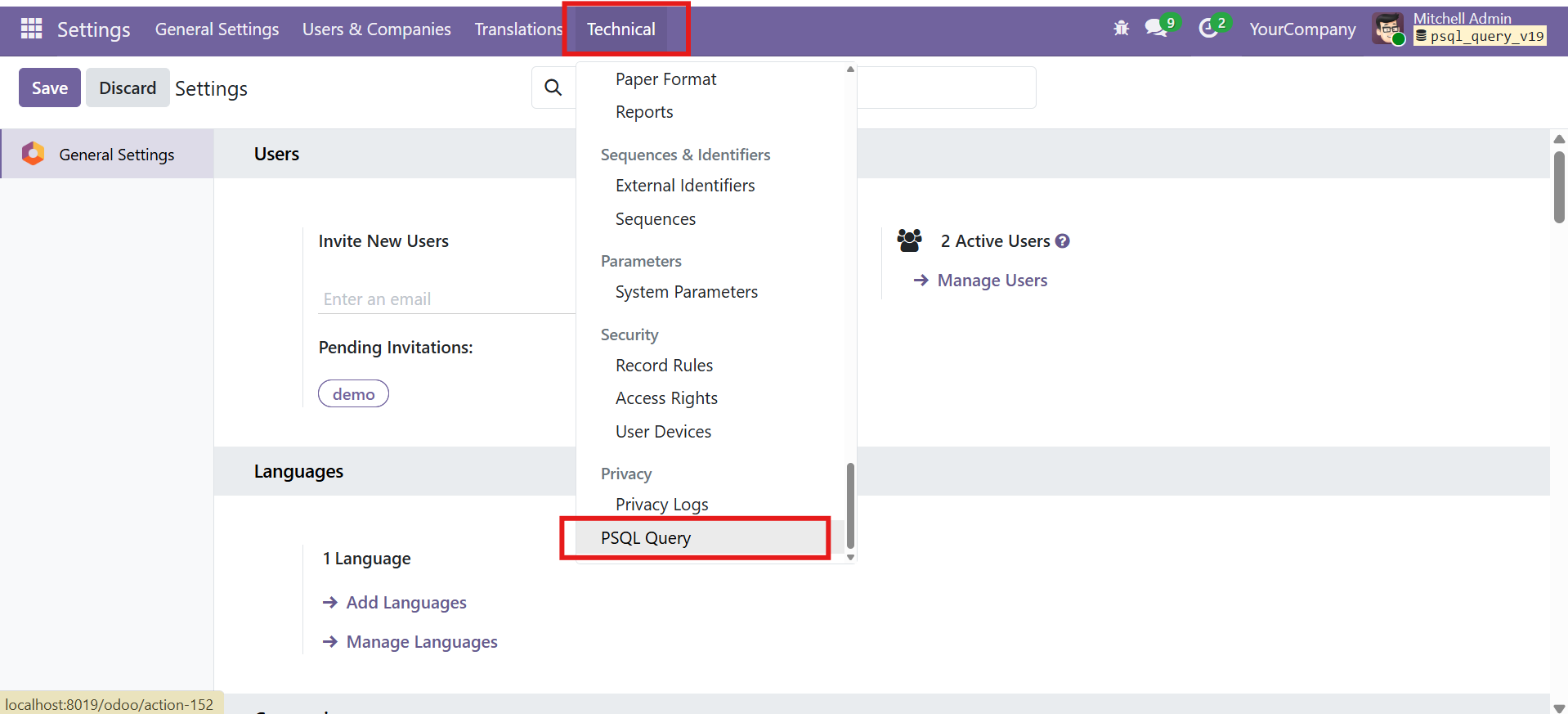
This module requires zero configuration. Once installed, it is immediately ready to use. Simply navigate to the menu and start executing queries.
Security and Access Control
Access to the PSQL Query Execute module is strictly restricted to system administrators to prevent unauthorized database access.
Access Restriction
The module uses Odoo's built-in base.group_system (Settings / System Administrator) group for access control. No custom security groups are created.
| Model | Group | Read | Write | Create | Delete |
|---|---|---|---|---|---|
psql.query | System Administrator (base.group_system) | Yes | Yes | Yes | Yes |
Only users with the Settings / System Administrator role can access this module. Regular users, including accounting managers and project managers, will not see the menu or be able to access query records. This is by design -- direct database queries should only be executed by authorized technical personnel.
Query Safety Guards
In addition to access control, the module enforces safety at the query execution level:
| Guard | Behavior |
|---|---|
| SELECT Only | Only queries starting with SELECT are allowed. All other SQL operations (INSERT, UPDATE, DELETE, DROP, ALTER, CREATE, TRUNCATE, etc.) are blocked. |
| Empty Query Check | Empty or whitespace-only queries are rejected with a validation error. |
| Execution Errors | SQL syntax errors or runtime errors are caught and displayed as clear validation error dialogs. |
Controller Authentication
The XLSX download endpoint (/psql_query/download_xlsx/<record_id>) requires user authentication (auth='user'). Unauthenticated requests are redirected to the login page.
Menu and Navigation
The module adds a single menu item under Odoo's Technical settings area.
Menu Location
Navigate to: Settings > Technical > PSQL Query
Available Views
| View | Description |
|---|---|
| List View (Tree) | Shows all saved queries with their name and query text. Click any row to open the form view. |
| Form View | Full query editor with name, SQL input, execute button, result display, XLSX export, and chatter. |
You need Developer Mode enabled to see the Technical submenu under Settings. Go to Settings > General Settings > Developer Tools > Activate Developer Mode.
Module File Structure
sdlc_psql_query_execute/
├── __init__.py
├── __manifest__.py
├── controllers/
│   ├── __init__.py
│   └── psql_query_controller.py
├── models/
│   ├── __init__.py
│   └── psql_query.py
├── security/
│   └── ir.model.access.csv
├── views/
│   └── psql_query_views.xml
└── static/
    ├── description/
    │   ├── index.html
    │   └── photo[1-8].png
    └── src/
        └── css/
            └── psql_query.css
Contact SDLC Corp at sdlccorp.com/contact-us or email sales@sdlccorp.com