Aging Analysis (Aged Partner Balance)
An aging analysis report that categorizes outstanding partner balances into customizable time buckets, helping you manage overdue receivables and payables.
Purpose
The Aged Partner Balance report provides a clear view of outstanding receivables and payables organized by how long they have been overdue. This is essential for credit management, collections follow-up, and cash flow forecasting.
Generating the Report
Navigate to Accounting > Reporting > Financial Reports > Aged Partner Balance to open the wizard.
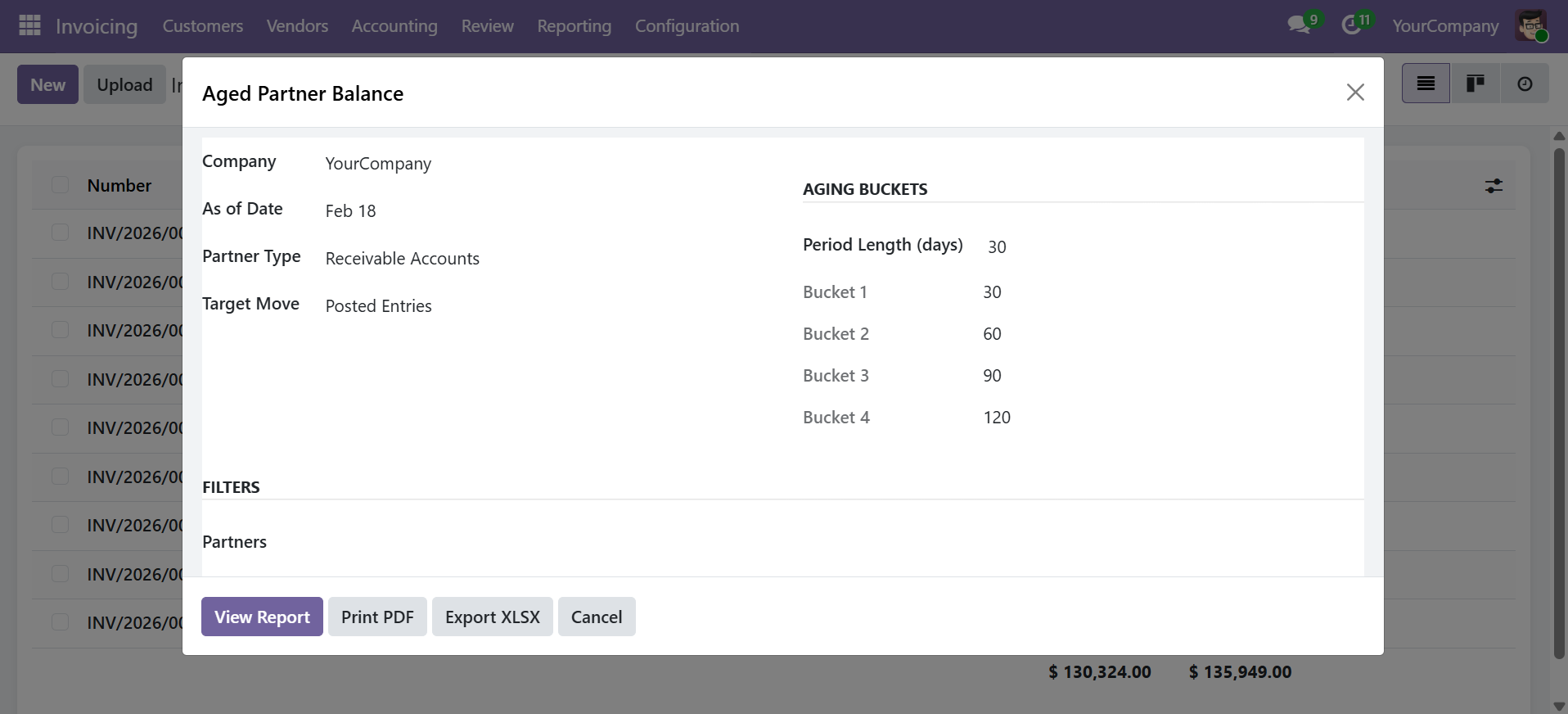
Wizard Parameters
| Parameter | Description |
|---|---|
| Company | Company to report on (required) |
| As of Date | Reference date for aging calculation (default: today) |
| Partner Type | Receivable (Customers), Payable (Suppliers), or Both |
| Target Moves | Posted Entries (default) or All Entries |
| Period Length (days) | Days per bucket (default: 30 days) |
| Bucket 1 / 2 / 3 / 4 | Aging bucket boundaries (configurable in Company Settings) |
| Partners | Filter by specific partners (optional) |
Click View Report to display the interactive view, Print PDF for a formatted document, or Export XLSX for a spreadsheet.
Aging Buckets
The report distributes outstanding balances into the following aging buckets:
| Bucket | Default Range | Description |
|---|---|---|
| Not Due | Future dated | Entries with maturity date after the "As of Date" |
| 0-30 | 0 - 30 days | Overdue up to 30 days |
| 30-60 | 30 - 60 days | Overdue 30 to 60 days |
| 60-90 | 60 - 90 days | Overdue 60 to 90 days |
| 90-120 | 90 - 120 days | Overdue 90 to 120 days |
| Over 120 | 120+ days | Severely overdue entries |
Aging bucket boundaries are configured in Accounting > Configuration > Settings > Dynamic Financial Reports. You can change them to any values (e.g., 15, 30, 45, 60 days) to match your business requirements.
Report Output
Each row shows a partner with their outstanding balance distributed across the aging buckets:
| Column | Description |
|---|---|
| Partner | Partner name |
| Not Due | Amount not yet due |
| 0-30 | Amount overdue 0-30 days |
| 30-60 | Amount overdue 30-60 days |
| 60-90 | Amount overdue 60-90 days |
| 90-120 | Amount overdue 90-120 days |
| Over 120 | Amount overdue 120+ days |
| Total | Total outstanding balance for the partner |
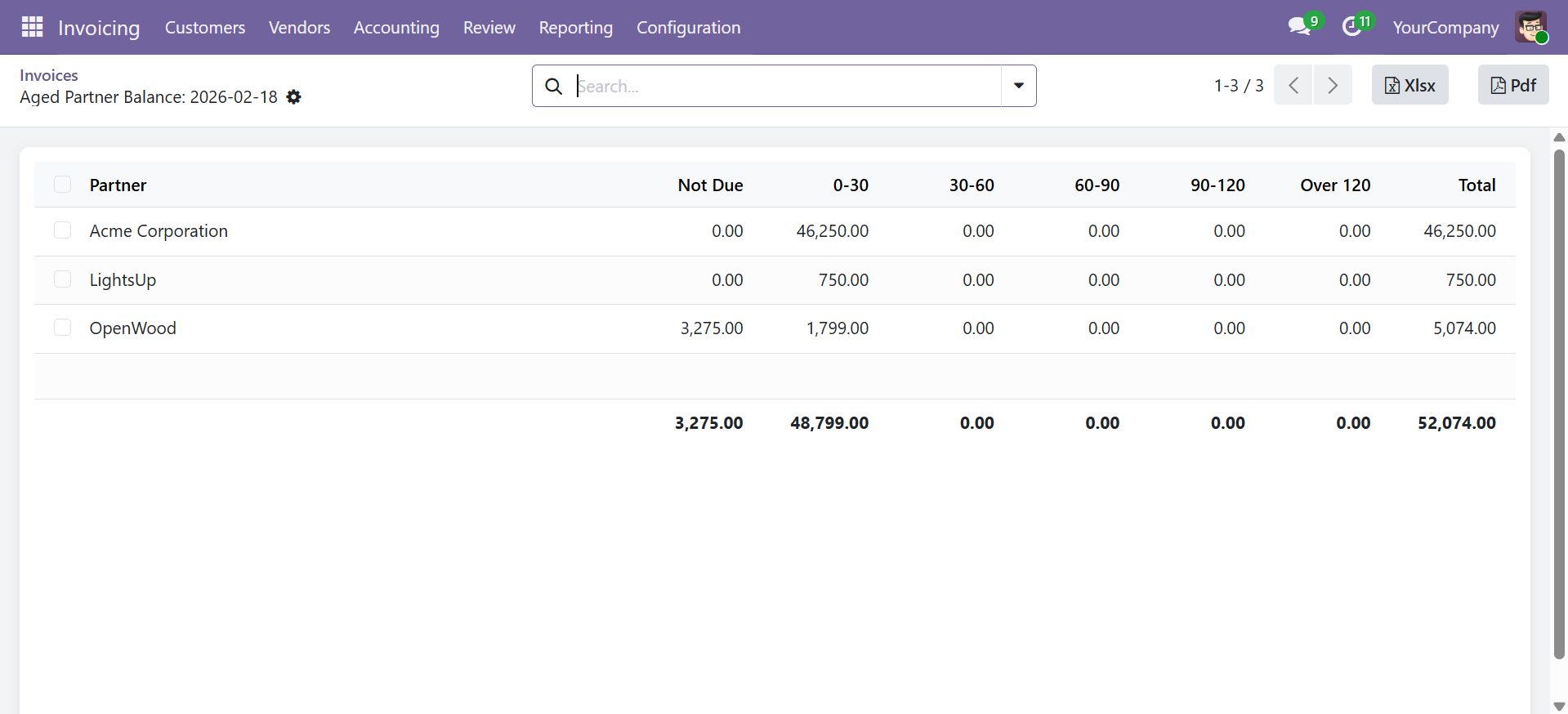
The bottom row displays grand totals across all partners for each aging bucket.
Use Cases
- Collections Management -- Identify customers with overdue balances and prioritize follow-up
- Credit Risk Assessment -- Review aging trends to assess customer creditworthiness
- Supplier Payment Planning -- Track upcoming and overdue payables for cash flow planning
- Audit Preparation -- Provide auditors with a clear breakdown of receivables and payables aging
Export Options
- View Report -- Opens an interactive list view with sorting and searching
- Print PDF -- Generates a professional landscape A4 PDF with company branding
- Export XLSX -- Downloads a formatted Excel file with frozen headers and number formatting
Contact SDLC Corp at sdlccorp.com/contact-us or email sales@sdlccorp.com