General Ledger, Partner Ledger & Analytic Summary
This page covers three additional reports: the General Ledger for detailed transaction history, the Partner Ledger for receivables/payables by partner, and the Analytic Summary for analysis by analytic accounts.
General Ledger
A complete transaction history organized by account, showing every journal entry with running balances, initial balances, and account-level totals.
Purpose
The General Ledger provides a detailed view of all accounting transactions posted to each account within a selected date range. It is the primary tool for auditing and verifying account balances.
Generating the Report
Navigate to Accounting > Reporting > Financial Reports > General Ledger to open the wizard.
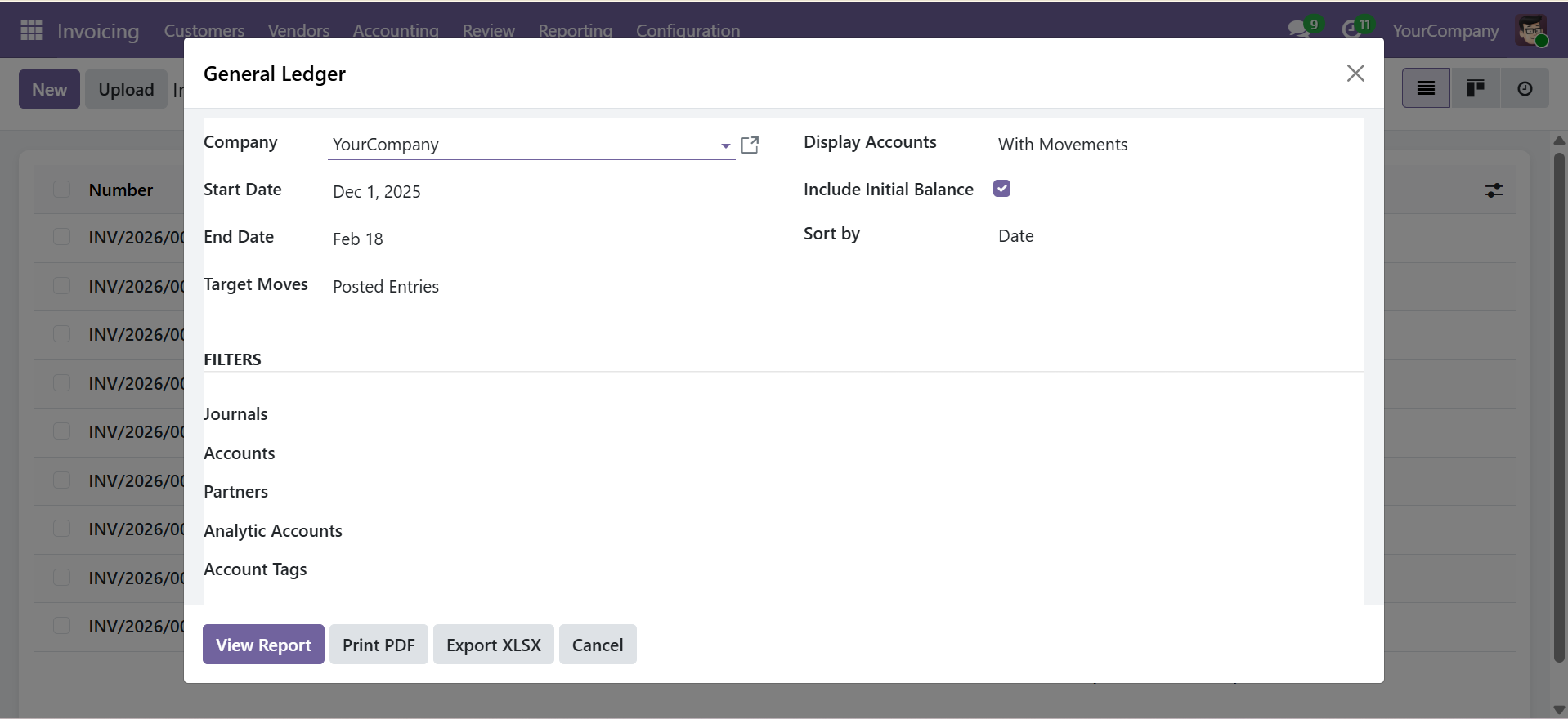
Wizard Parameters
| Parameter | Type | Description |
|---|---|---|
| Company | Selection | Company to generate the report for (required) |
| Date From | Date | Start date of the reporting period (required) |
| Date To | Date | End date of the reporting period (required) |
| Target Moves | Selection | Posted Entries or All Entries (includes draft) |
| Display Accounts | Selection | All, With Movements, or Non-Zero Balance Only |
| Initial Balance | Checkbox | Show opening balance row for each account (default: On) |
| Sort By | Selection | Date or Journal & Partner |
| Journals | Multi-select | Filter by specific journals (optional) |
| Accounts | Multi-select | Filter by specific accounts (optional) |
| Partners | Multi-select | Filter by specific partners (optional) |
| Analytic Accounts | Multi-select | Filter by analytic accounts (optional) |
| Account Tags | Multi-select | Filter by account tags (optional) |
Report Output
| Column | Description |
|---|---|
| Code | Account code |
| Account | Account name |
| Date | Transaction date |
| Journal | Journal in which the entry was posted |
| Partner | Partner associated with the entry |
| Label | Entry description/label |
| Debit | Debit amount |
| Credit | Credit amount |
| Balance | Running cumulative balance |
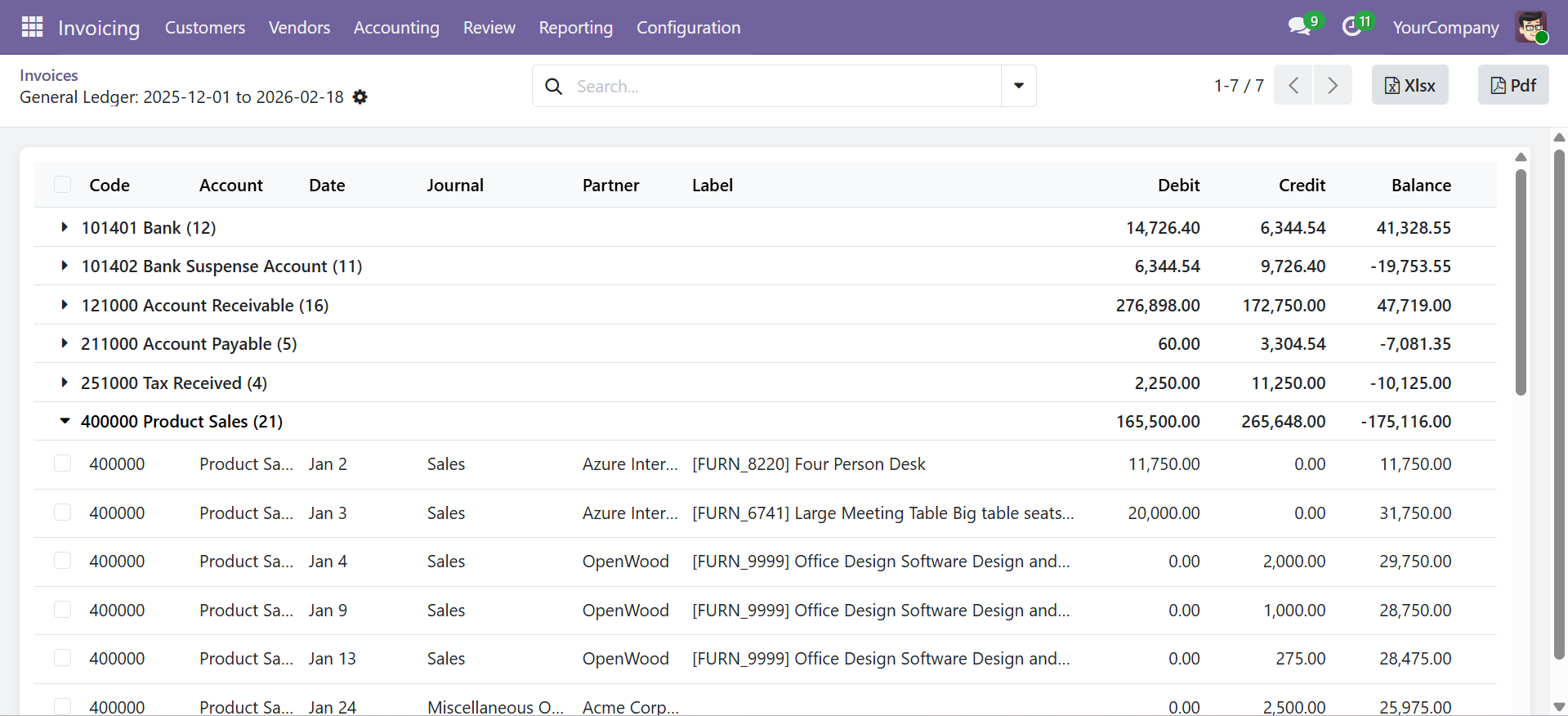
Each account section includes:
- Initial Balance row -- Opening balance before the date range (if enabled)
- Transaction lines -- All entries within the date range
- Total row -- Sum of debit, credit, and ending balance for the account
Partner Ledger
View receivables and payables broken down by partner, with customer/supplier filtering, initial balances, and running balance tracking.
Purpose
The Partner Ledger shows all accounting transactions grouped by partner, making it easy to review outstanding balances, payment history, and account activity for individual customers or suppliers.
Generating the Report
Navigate to Accounting > Reporting > Financial Reports > Partner Ledger to open the wizard.
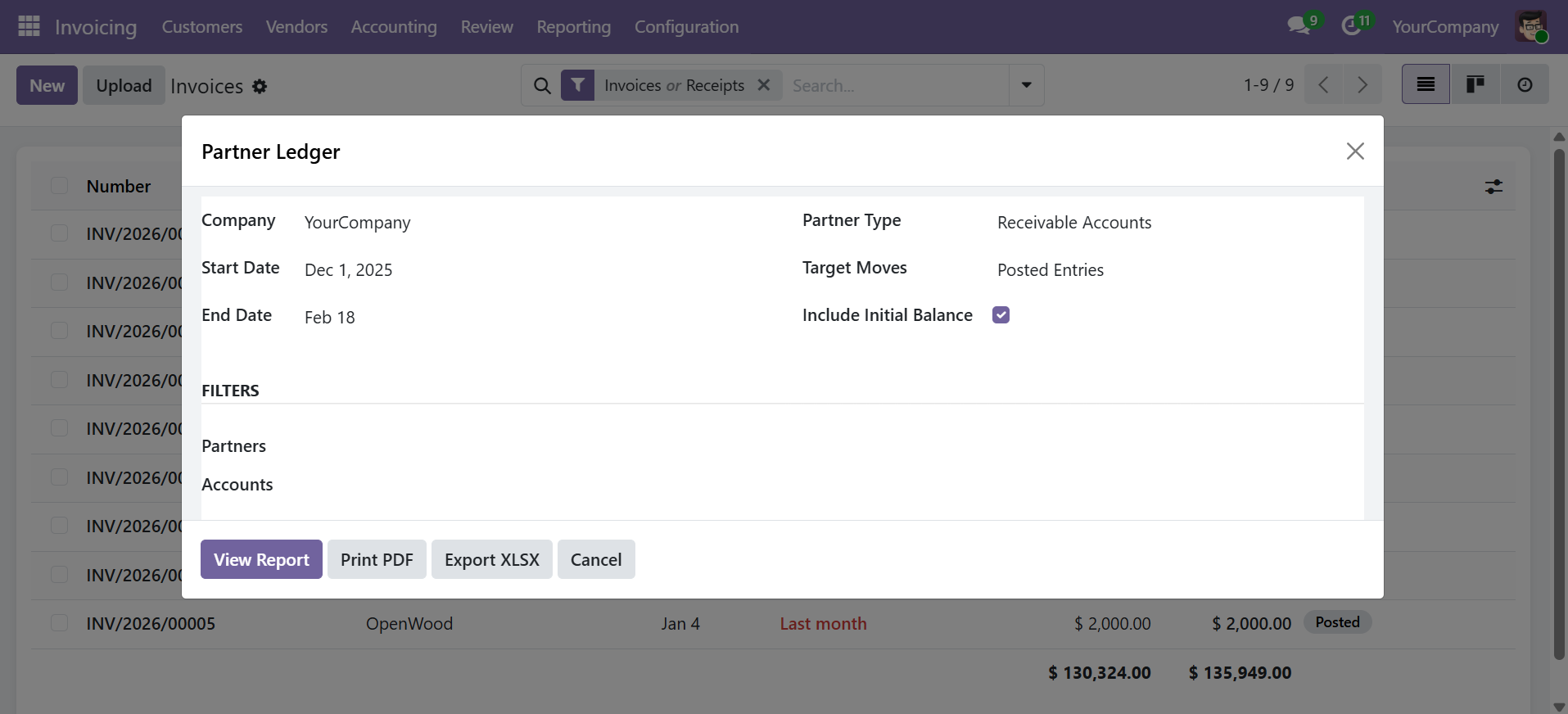
Wizard Parameters
| Parameter | Description |
|---|---|
| Company | Company to report on (required) |
| Date From / Date To | Reporting period (required) |
| Partner Type | Receivable (Customers), Payable (Suppliers), or Both |
| Target Moves | Posted Entries or All Entries |
| Initial Balance | Show opening balance per partner (default: On) |
| Partners | Filter by specific partners (optional) |
| Accounts | Filter by specific accounts (optional) |
Report Output
Transactions are grouped by partner with the following columns:
| Column | Description |
|---|---|
| Partner | Partner name (group header) |
| Date | Transaction date |
| Journal | Journal name |
| Account | Account code and name |
| Label | Entry description |
| Debit | Debit amount |
| Credit | Credit amount |
| Balance | Running cumulative balance |
| Initial Balance | Opening balance before the date range |
| Total Line | Total for each partner |
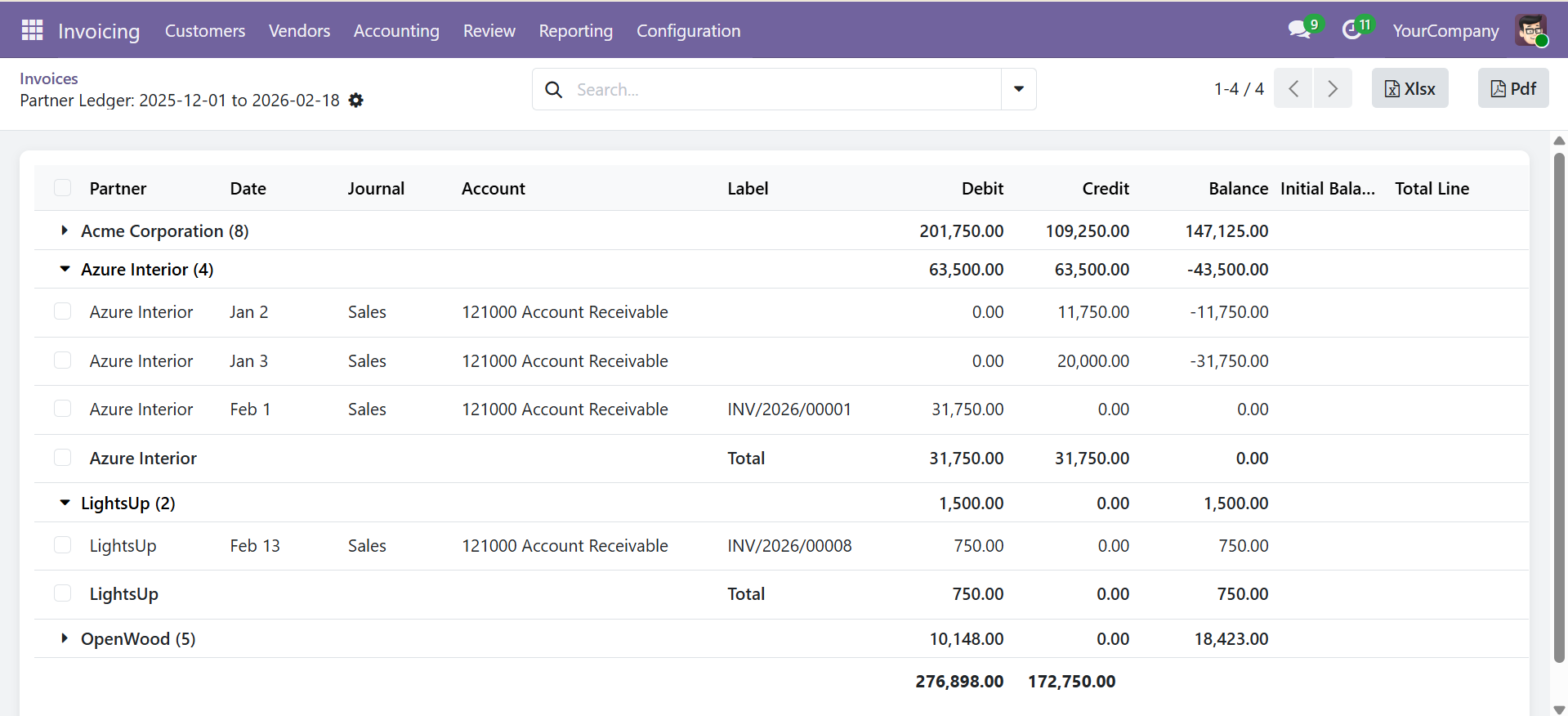
Each partner section includes an initial balance row (if enabled) and a total row with cumulative debit, credit, and balance.
Analytic Summary Report
An analysis of journal entries by analytic accounts, showing debit, credit, and balance for each analytic account with plan-based grouping.
Purpose
The Analytic Summary Report provides insight into how costs and revenues are distributed across analytic accounts (cost centers, projects, departments). It automatically reads Odoo's analytic distribution percentages and proportionally allocates amounts.
Generating the Report
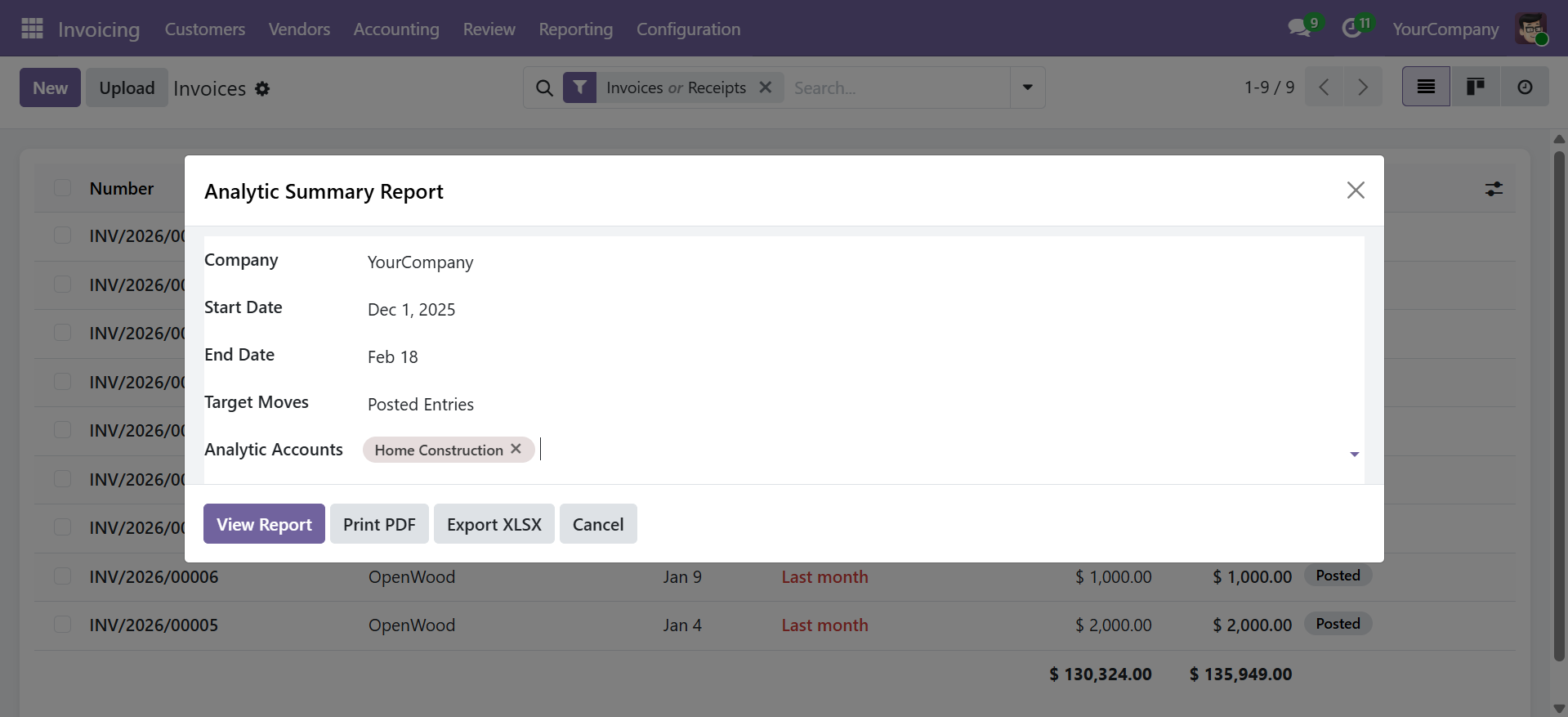
Navigate to Accounting > Reporting > Financial Reports > Analytic Summary Report to open the wizard.
Wizard Parameters
| Parameter | Description |
|---|---|
| Company | Company to report on (required) |
| Date From / Date To | Reporting period (required) |
| Analytic Accounts | Filter by specific analytic accounts (optional) |
| Target Moves | Posted Entries (default) or All Entries |
Report Output
| Column | Description |
|---|---|
| Analytic Account | Analytic account name |
| Code | Analytic account code |
| Partner | Partner linked to the analytic account |
| Plan | Analytic plan associated with the account |
| Company | Company of the analytic account |
| Debit | Total debit amount (proportional to analytic distribution %) |
| Credit | Total credit amount (proportional to analytic distribution %) |
| Balance | Debit - Credit |
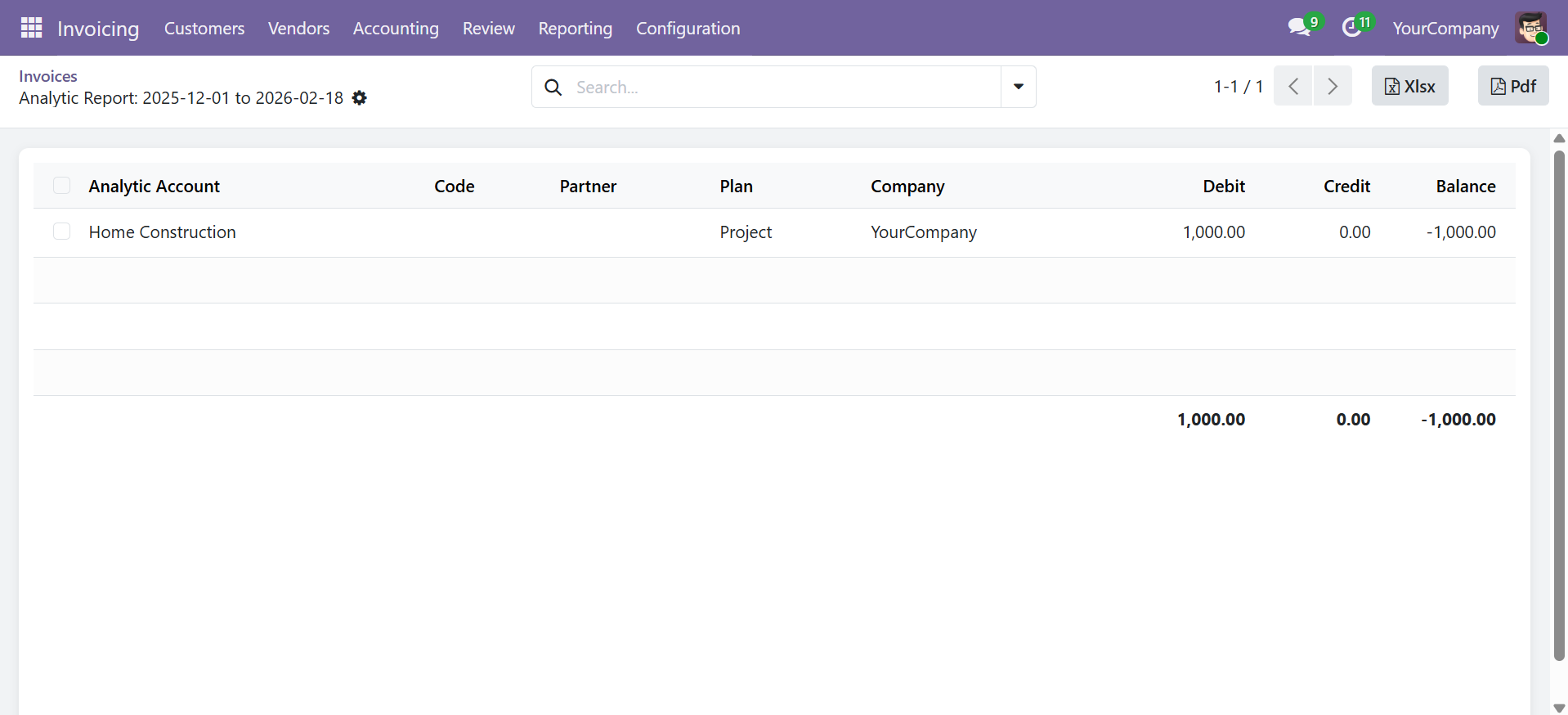
Odoo uses a JSON-based analytic_distribution field on journal entry lines. The report automatically reads the distribution percentages and proportionally allocates debit/credit amounts to each analytic account.
Export Options (All Reports)
All three reports support the same output options:
- View Report -- Opens an interactive list view with sorting and searching
- Print PDF -- Generates a professional landscape A4 PDF with company branding
- Export XLSX -- Downloads a formatted Excel file with frozen headers and number formatting
Contact SDLC Corp at sdlccorp.com/contact-us or email sales@sdlccorp.com