Cash Flow Statement
A cash flow statement showing Operating, Investing, and Financing activities with net cash change, auto-calculated from account movements.
Purpose
The Cash Flow Statement tracks the movement of cash in and out of your organization over a specified period. It categorizes cash flows into three activity types and calculates the net change in cash, providing insight into liquidity and cash management.
Generating the Report
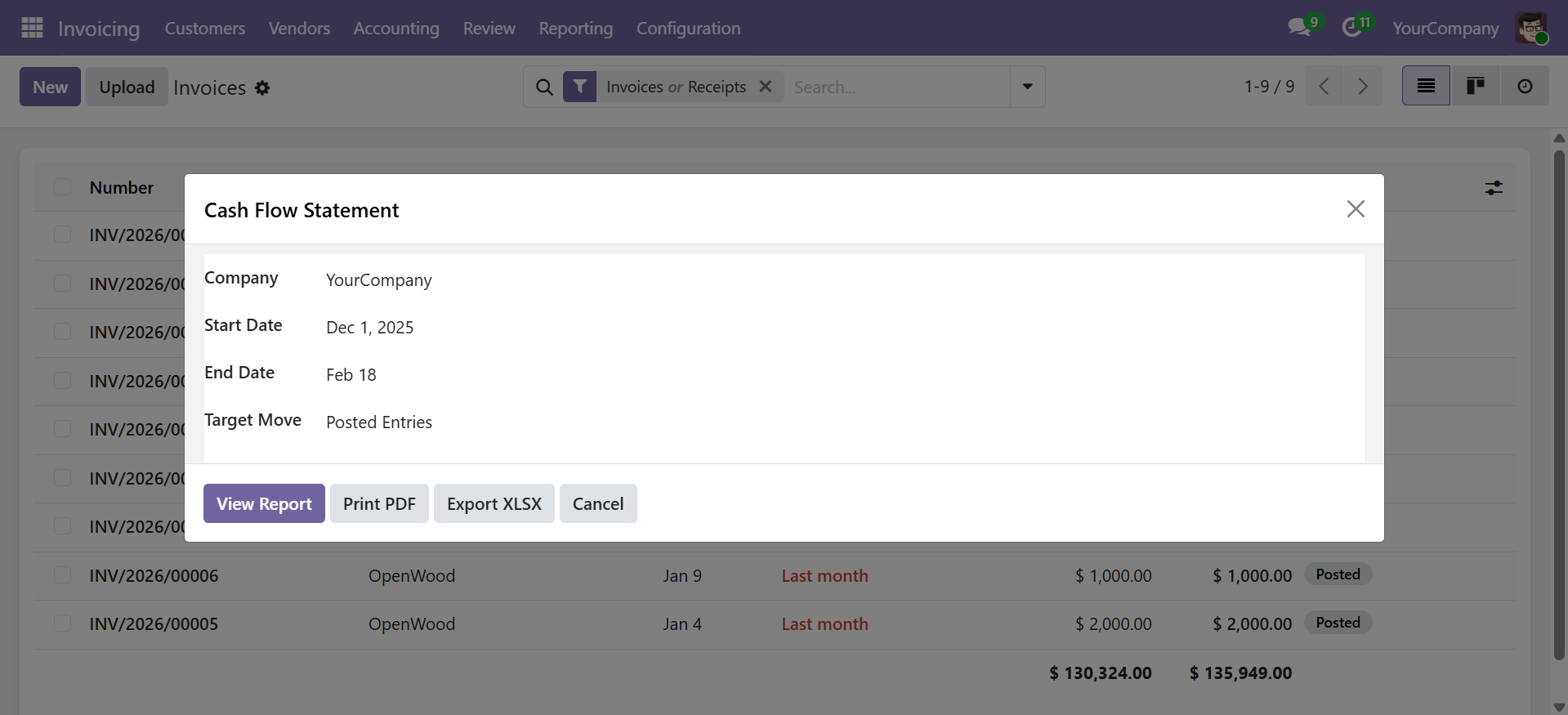
Navigate to Accounting > Reporting > Financial Reports > Cash Flow Statement to open the wizard.
Wizard Parameters
| Parameter | Description |
|---|---|
| Company | Company to report on (required) |
| Date From / Date To | Reporting period (required) |
| Target Moves | Posted Entries (default) or All Entries |
Click View Report to display the interactive view, Print PDF for a formatted document, or Export XLSX for a spreadsheet.
Report Structure
The report automatically categorizes cash flows into three sections based on account types:
| Section | Description | Account Types |
|---|---|---|
| Operating Activities | Cash from core business operations | Income, Expense, Receivables, Payables, Current Assets, Current Liabilities |
| Investing Activities | Cash from investment operations | Fixed Assets, Non-current Assets, Prepayments |
| Financing Activities | Cash from financing operations | Equity, Non-current Liabilities |
| Summary | Net change in cash | Net Cash Change (Operating + Investing + Financing) |
Report Output
| Column | Description |
|---|---|
| Label | Description of the cash flow line item |
| Amount | Cash flow amount for the period |
Each line is typed as one of the following:
| Row Type | Description |
|---|---|
| Section | Section header (e.g., "OPERATING ACTIVITIES") |
| Normal | Individual line item with account details |
| Total | Section subtotal (e.g., "Net Cash from Operating Activities") |
| Grand Total | Net cash change across all activities |
Reading the Report
- Positive amounts indicate cash inflows (money received)
- Negative amounts indicate cash outflows (money spent)
- The Net Cash Change at the bottom represents the total increase or decrease in cash during the period
- Operating Activities typically show the core business cash generation
- Investing and Financing sections show longer-term cash movements
Export Options
- View Report -- Opens an interactive list view with sorting and searching
- Print PDF -- Generates a professional landscape A4 PDF with company branding
- Export XLSX -- Downloads a formatted Excel file with section highlighting
Contact SDLC Corp at sdlccorp.com/contact-us or email sales@sdlccorp.com